AI Coding Agent: Claude Code vs Codex Which Is Better in 2026?
If you build software regularly, you know the frustrating part is not always writing code. It is navigating an unfamiliar repository, tracing a bug across several files, running tests, reviewing changes, and then discovering one small dependency broke everything. An AI Coding Agent can take over much of that multi-step work instead of merely suggesting the next line of code.
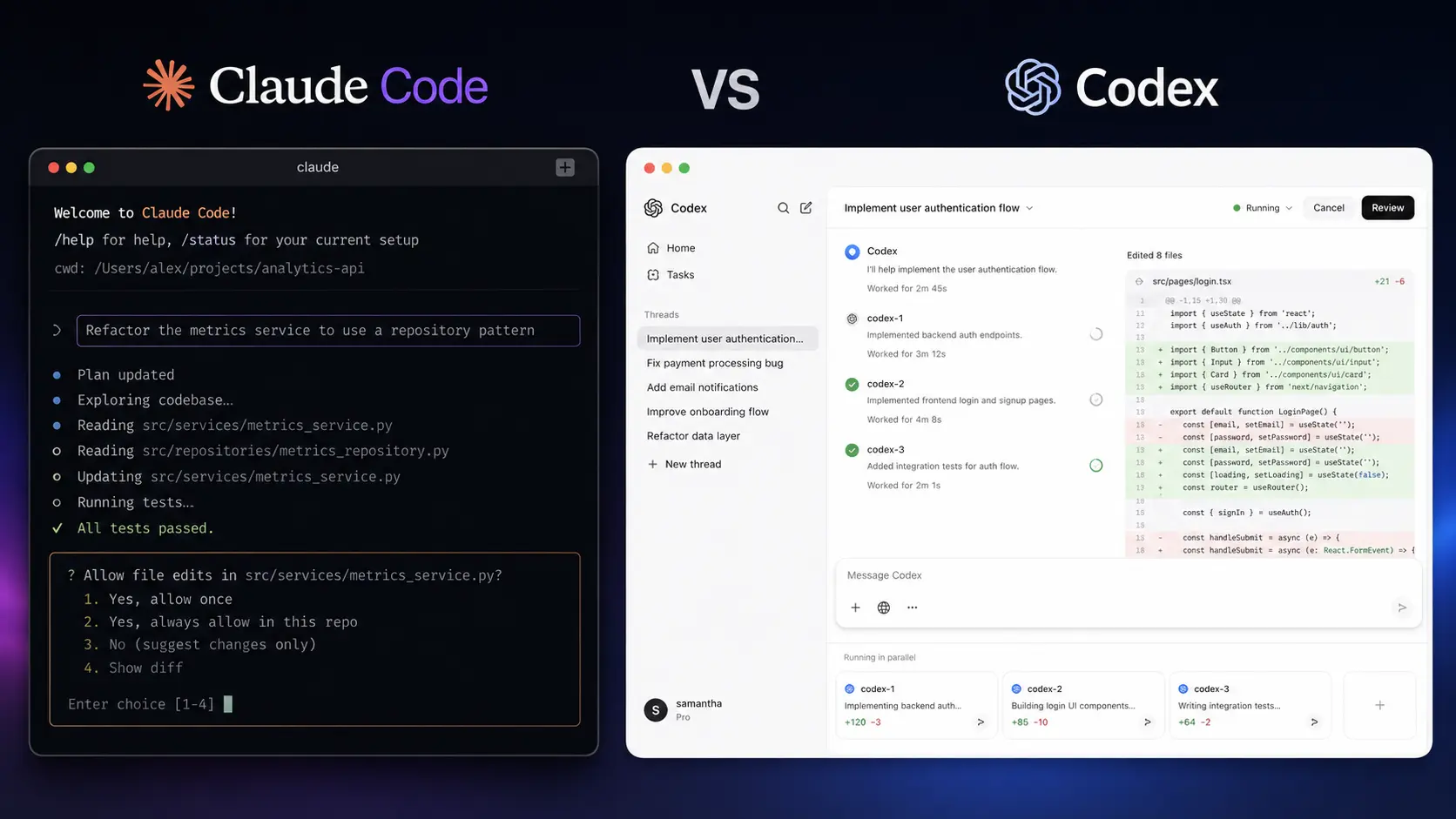
Two of the strongest options in 2026 are Claude Code and Codex. Both can inspect repositories, modify files, run development commands, and work through larger coding tasks, but they approach the developer workflow differently. This comparison looks at where each tool fits, what you actually get for your money, and which one makes more sense for different development styles.
How We Evaluate These AI Coding Agents
We evaluated 2 AI coding tools across typical software-development workflows, focusing on how they behave when you give an agent a real task rather than a simple “write this function” prompt.
The evaluation focused on:
- Repository understanding: Can the agent find relevant files and understand existing code?
- Implementation: How well does it make multi-file changes?
- Debugging and testing: Does it investigate failures and verify fixes?
- Developer control: How clearly can you review or restrict changes?
- Workflow flexibility: CLI, IDE, desktop, cloud, and automation options.
- Pricing and usage: How practical are the included limits for regular development?
The goal is not to declare one model universally smarter. For developers, workflow fit can matter just as much as raw model capability.
AI Coding Agent Comparison at a Glance
| Tool Name | Best For | Starting Price |
| Claude Code | Terminal-first development and complex repository work | $20/month |
| Codex | Parallel tasks, code review, and cloud-assisted development | Included with eligible ChatGPT plans |
Claude Code is available with eligible Claude plans. Anthropic’s current Claude Code documentation covers installation, CLI usage, permissions, sessions, MCP, and other developer workflows.
Codex is currently included across ChatGPT plans, including Free and Go, although usage limits vary by plan.
Claude Code: Best AI Coding Agent for Terminal-First Development
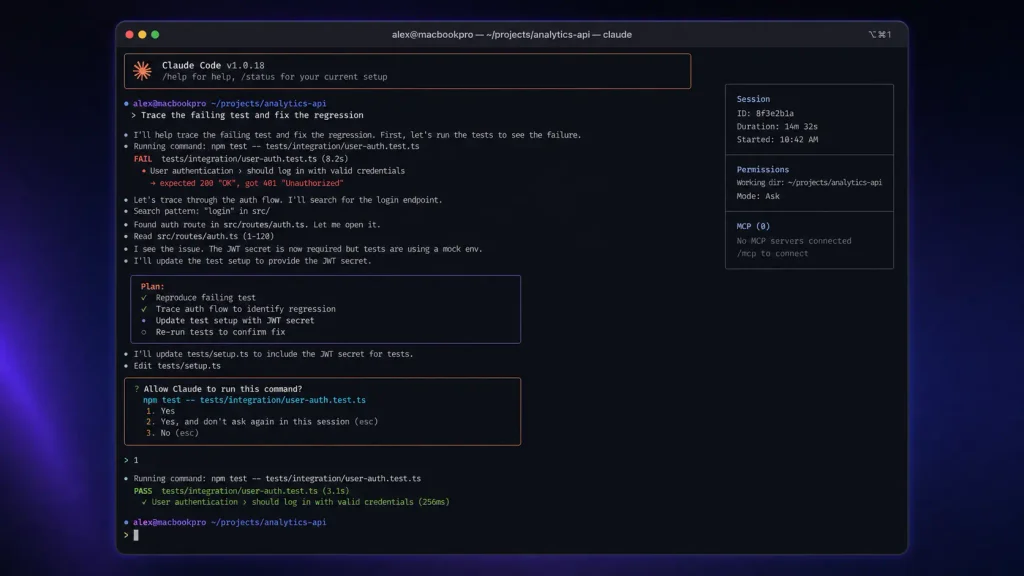
If your natural habitat is a terminal window, Claude Code feels particularly well matched to the way you already work.
Rather than moving your code into a separate browser editor, you launch it inside your project and let the agent inspect the repository, reason about the task, edit files, and execute commands.
One useful detail is how much control the CLI exposes. You can continue previous sessions, configure permissions, and control which tools the agent is allowed to use. That makes the workflow more practical when you are working on a repository where an unrestricted agent could potentially execute commands you did not intend.
You can explore the current Claude Code documentation if you want to see how the CLI and development workflow are structured.
In practical development, Claude Code is strongest when the task requires understanding existing architecture rather than generating isolated snippets. It is also convenient if your workflow already revolves around Git, shell commands, tests, and pull requests.
If you want to compare this terminal-first approach with dedicated AI-powered editors, see our AI Code Editors.
Pros
- Excellent fit for terminal-based, repository-level development.
- Detailed CLI controls make permissions and sessions easier to manage.
Cons
- Usage limits can become noticeable during intensive coding sessions.
- Windows users may need an appropriate terminal environment depending on their setup.
Pricing: Claude Code is available through Claude plans, including Pro at $20/month, with higher-usage Max options. Anthropic has also increased Claude Code rate limits for Pro, Max, Team, and seat-based Enterprise plans.
Codex: Best AI Coding Agent for Parallel and Long-Running Work
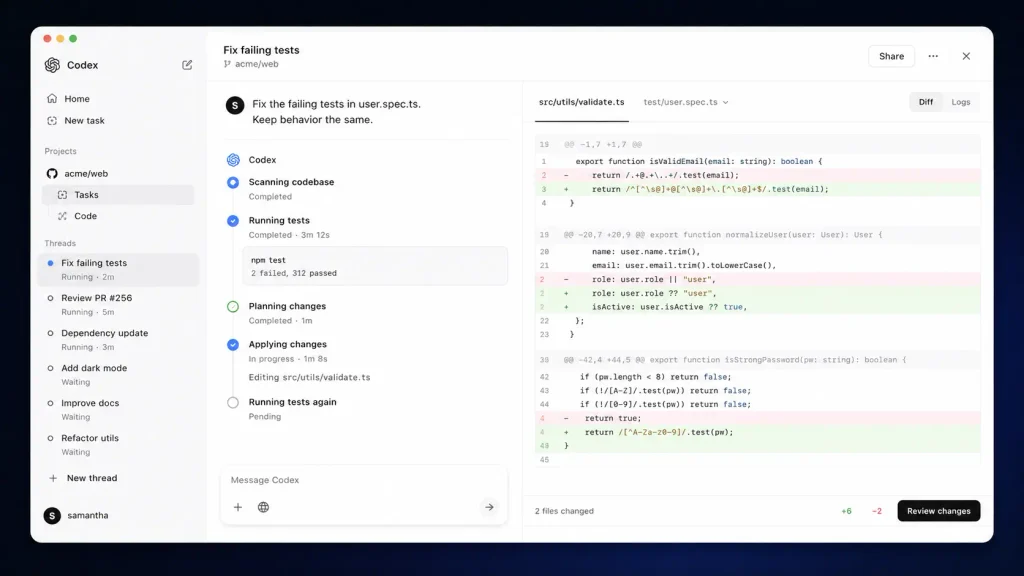
Codex takes a somewhat different route. It is not limited to being a command-line assistant; OpenAI has expanded it into a broader agentic development environment covering the CLI, IDE, desktop app, and cloud workflows.
The biggest practical distinction appears when you have multiple coding jobs to manage. The Codex app is designed around running multiple agents in parallel, delegating longer tasks, and reviewing their results rather than keeping one agent conversation open at a time.
OpenAI describes the Codex app as a command center for agents, with support for multiple agents working in parallel, skills, and automations.
That makes Codex attractive when your development day looks like this: fix a bug in one branch, review another change, investigate a dependency issue, and let a longer-running task continue in the background.
You can also check the official Codex documentation for current setup and development options.
Codex supports code-review workflows and can work with local repositories as well as cloud-based tasks. OpenAI’s current documentation also explains how Codex usage is measured across local tasks, cloud tasks, automations, code review, and delegated workers.
Pros
- Strong fit for parallel, delegated, and long-running coding tasks.
- Broad workflow support across CLI, IDE, desktop, and cloud environments.
Cons
- Usage can vary significantly depending on model, task complexity, and concurrency.
- The wider agent ecosystem can take longer to understand than a simple terminal workflow.
Pricing: Codex is included across ChatGPT plans, with usage limits varying by plan. Eligible Plus and Pro users can purchase additional credits after included usage is reached.
Claude Code vs Codex: Key Technical Differences
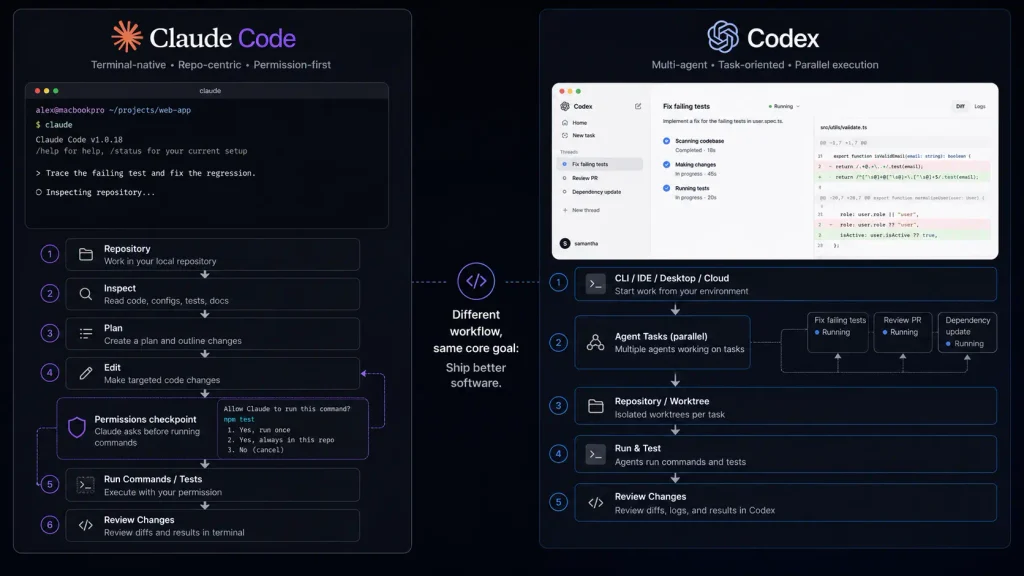
With only two tools, a huge technical comparison table would create more noise than value. These are the differences that actually affect your workflow:
| Feature | Claude Code | Codex |
| Primary workflow | Terminal-first | CLI + IDE + desktop + cloud |
| Repository editing | Yes | Yes |
| Command execution | Yes | Yes |
| Git-oriented workflows | Strong | Strong |
| Session continuation | Supported | Persistent task workflows |
| Parallel agents | Supported | Major focus |
| Code review | Supported | Dedicated workflow |
| Tool integrations | MCP support | Skills and integrations |
| Long-running work | Supported | Strong emphasis |
| Windows | Supported through available terminal environments | Windows app available |
| Pricing model | Subscription/API | ChatGPT plans + usage options |
Codex’s current desktop experience is explicitly designed around parallel agents and long-running work, while Claude Code remains especially attractive if you want a terminal-centered development workflow with granular controls.
Which One Is Better for Developers?
The answer depends heavily on how you code.
Choose Claude Code if you live in the terminal
If you already spend most of your day inside Bash, Zsh, Git, package managers, test runners, and deployment scripts, Claude Code has a very natural fit. It also makes sense when you want the agent to work directly inside a repository while giving you granular control over which tools can execute without confirmation. Anthropic also provides organization-level controls for Team and Enterprise users, including spending controls and administrative management.
Choose Codex if you want an agent manager
Codex becomes more compelling when development is less about one interactive session and more about delegating several pieces of work. For example, you could have one agent investigate a failing test suite while another works on a feature and another prepares a review. The multi-agent workflow is one of Codex’s most useful differences. OpenAI specifically designed its Codex app around this approach.
What about large repositories?
Neither tool should be judged simply by how much code it can theoretically read. Large repositories create practical problems: irrelevant files consume context, dependencies obscure the source of bugs, and tests may take longer than the actual edit. The better agent is the one that can identify the right files, make a limited change, run the relevant checks, and explain what happened without creating unnecessary churn. That’s why your own repository is the best benchmark.
Pricing: Claude Code vs Codex
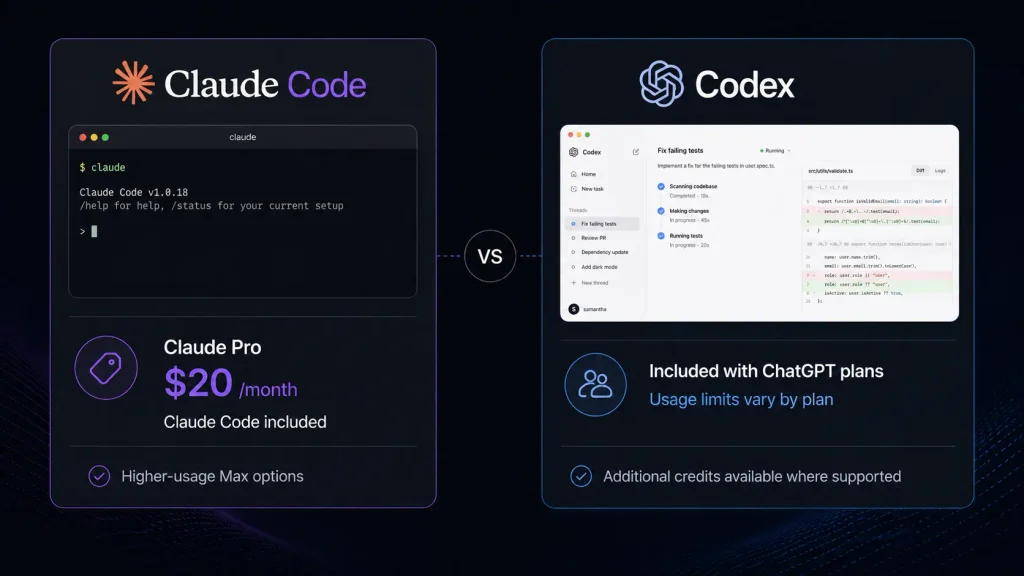
Pricing is one area where the two products are difficult to compare with a single monthly number. Claude Code is available through Claude subscriptions, with Pro at $20/month and higher-usage Max plans. Anthropic says it doubled Claude Code’s five-hour rate limits for Pro, Max, Team, and seat-based Enterprise plans in May 2026. You can review the latest Claude pricing information before subscribing because included usage and limits can change.
Codex works differently. It is included across ChatGPT plans, with usage limits determined by the plan. Plus and Pro users who reach their included Codex limits can purchase credits for supported usage. OpenAI’s current rate card explains that Codex usage can be calculated from input, cached input, and output tokens, with the exact consumption depending on the model and task.
For example, OpenAI currently lists GPT-5.3-Codex at $1.75 per 1 million input tokens, $0.175 per 1 million cached input tokens, and $14 per 1 million output tokens for its API model pricing. You can check the official Codex pricing and usage information for the latest figures. For teams, usage-based pricing can make sense when developers need substantially different amounts of agent activity. For individual developers, predictable monthly pricing may be easier to budget.
Final Verdict: Claude Code or Codex?
Both are serious AI Coding Agent options in 2026, but they target slightly different working styles. Claude Code is the better choice if you want a focused, terminal-native coding partner with strong control over repository operations. Codex gets the edge if your priority is delegating work, running agents in parallel, and combining local development with cloud and desktop workflows. If you’re undecided, try each on the same small repository and give both the same bug, feature request, and test-fixing task. The more interesting question may not be which AI Coding Agent is smarter, but which one fits the way you already build software?
FAQ
Is Claude Code better than Codex for programming?
Not universally. Claude Code is particularly attractive for developers who prefer a terminal-first workflow and detailed command-level control. Codex is compelling if you want parallel agents, cloud tasks, automation, and a broader desktop workflow. The best AI Coding Agent depends on how your development process is structured.
Are AI coding agents safe to use on private repositories?
You should treat them like any other third-party development service. Before connecting a private repository, review the provider’s data handling, retention, account controls, and organizational policies.
You should also avoid giving an agent unnecessary permissions. If an agent can modify files, install packages, or execute commands, you should understand exactly what access you are granting.
OpenAI also recommends reviewing agent-generated work before making changes or deploying to production rather than treating automated review as a replacement for human review.
Are there alternatives worth watching?
Absolutely. Cursor, GitHub Copilot, Windsurf, and open-source coding-agent projects remain important alternatives. You may also prefer a conventional AI coding assistant if you mainly want autocomplete or small code explanations rather than an autonomous agent that can work through a repository.
Editorial disclosure: This comparison is based on hands-on workflow evaluation and current official product documentation; pricing and limits can change.