AI Content Creation: Solo Content Studio Review 2026, Features and Pricing
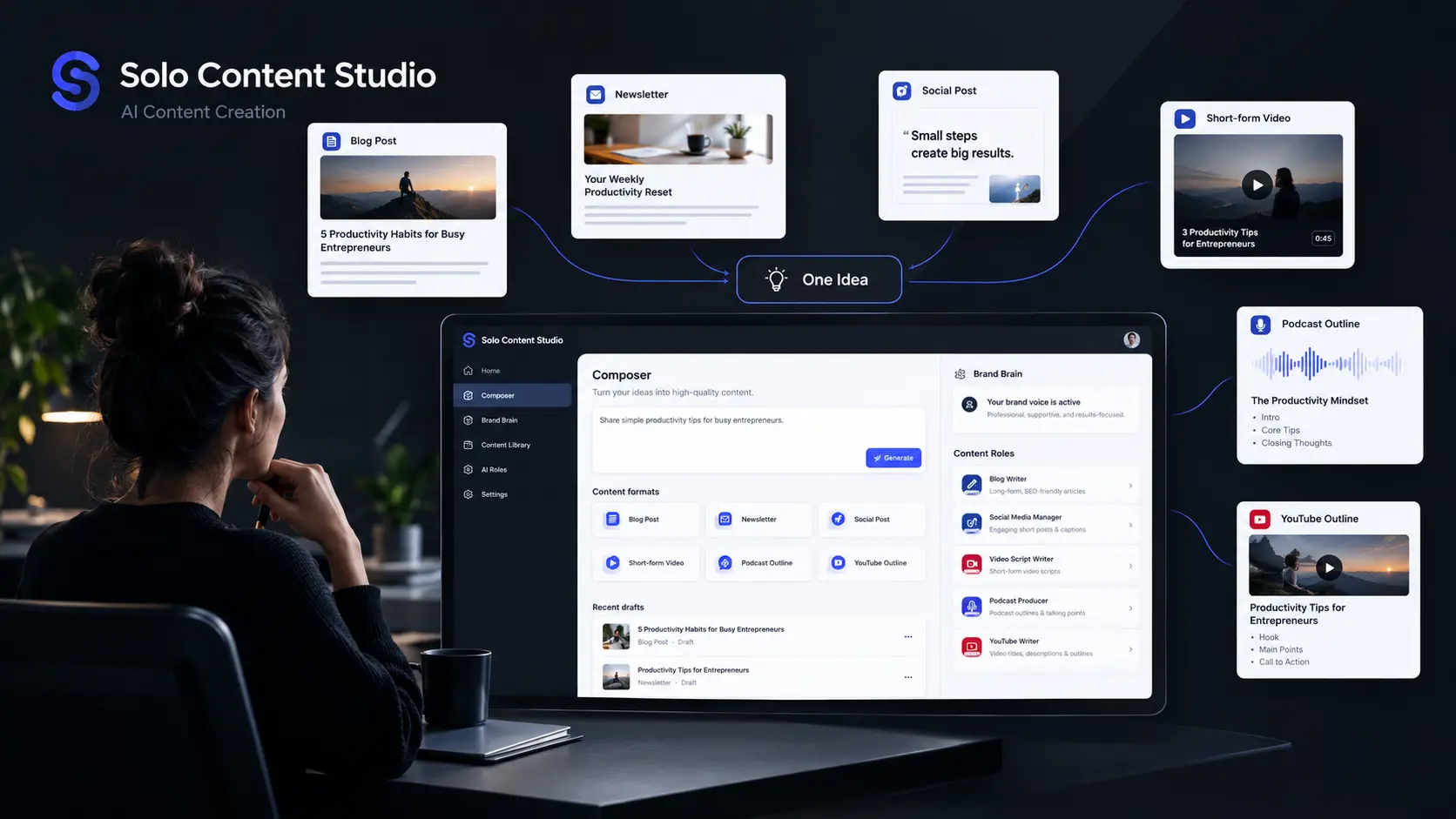
Creating enough content to stay visible can quickly become a second full-time job. AI Content Creation tools promise to reduce that workload, but many still leave you jumping between prompts, chats, templates, and editing windows. Solo Content Studio takes a different approach. Instead of presenting itself as a general-purpose AI chatbot, it organizes content creation around a virtual team of specialized writers and marketers. You can train the system around your brand voice, choose a content format, and generate drafts for blogs, newsletters, social posts, videos, emails, and more. We looked at its workflow, available formats, credit system, projects, automation features, and pricing to see where it fits among modern AI content writing tools.
How We Evaluate AI Content Creation Tools
We evaluated Solo Content Studio during September 2026, focusing on how practical it is for someone who needs to produce regular marketing content rather than simply experiment with AI.
Our evaluation focused on:
- Content workflow: How quickly you can move from an idea to a usable draft.
- Brand voice: How the platform collects and applies your writing preferences.
- Content formats: Blogs, social posts, newsletters, videos, emails, and other outputs.
- Automation: Whether recurring content can be prepared without starting from scratch.
- Usage limits: Credits, projects, regenerations, and plan restrictions.
- Pricing: What you actually receive at each subscription level.
Our perspective is based on evaluating AI writing software and content platforms from a practical publishing and SEO perspective, where consistency matters as much as raw generation speed.
At-a-Glance Comparison
| Tool | Best For | Starting Price |
| Solo Content Studio | Coaches and solo businesses building consistent branded content | $0 for 7 days, then $99/month |
Solo Content Studio: Best AI Content Creation Tool for Coaches and Solo Brands
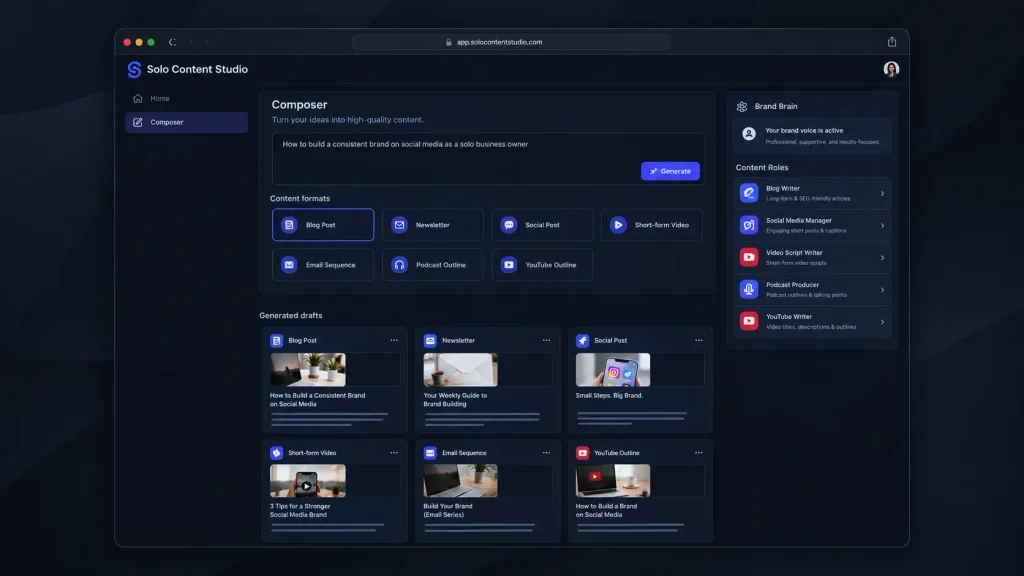
Solo Content Studio is designed around a fairly specific customer: a coach or solo business owner who needs a lot of content but does not want every post to sound machine-written. That focus is both its biggest strength and its biggest limitation.
The workflow starts with your brand information and writing samples. You then train individual specialists around your voice. The platform currently presents ten specialists covering areas such as blog writing, newsletters, social content, video, podcasts, email sequences, sales pages, and repurposing. One particularly useful workflow is the Composer. You enter a topic and can select formats such as newsletter, text post, short video, blog post, podcast, or YouTube outline. Rather than manually asking for each piece, the system can create different drafts from the same underlying idea.
The Repurposer is another practical feature. It can take an existing piece and turn it into five fresh angles across selected formats. That makes more sense for a busy creator than simply generating another version of the same paragraph. You also get Autopilot, where you choose a publishing cadence and queue topics for future drafts. The platform says the system can prepare content on a schedule for review rather than automatically publishing it for you.
Pros
- Strong focus on maintaining a consistent brand voice across different content formats.
- Includes ten specialized content roles plus Composer, Repurposer, Idea Generator, and Autopilot.
Cons
- The product is heavily focused on coaches rather than general-purpose content teams.
- The paid plans are considerably more expensive than many basic AI writing tools.
Pricing: Solo Content Studio has a 7-day free trial with 100 credits, up to two projects, and access to all ten specialists and Autopilot. Standard costs $99/month with 1,000 monthly credits and up to two projects. Pro costs $199/month with 2,500 credits, unlimited projects, and unlimited regenerations. Annual billing saves 20%.
What Makes Solo Content Studio Different?
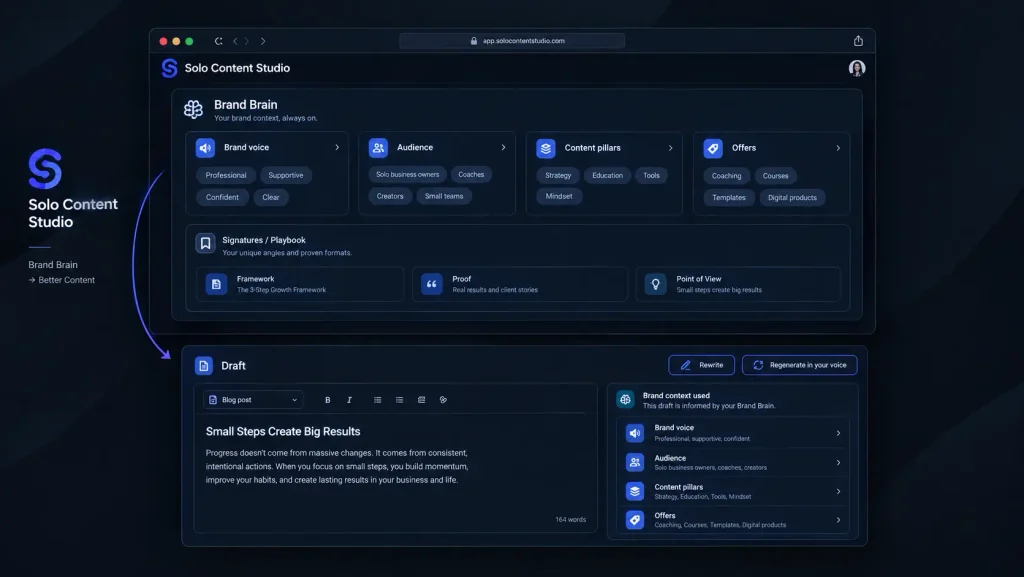
The interesting part of Solo Content Studio is not simply that it uses AI to write. Plenty of content creation tools already do that. Its approach is closer to building a repeatable content operation around your existing voice. Instead of repeatedly explaining your audience and preferred style inside a chatbot, Solo Content Studio stores brand information and specialist training inside the platform. The current product identifies Claude Opus 4.7 as the model powering the Studio, while the subscription includes the model usage rather than requiring you to purchase a separate Claude subscription.
That distinction matters if you are producing content every week. A general chatbot can produce an excellent article, but you may still spend time explaining what your company does, who the audience is, what tone you want, and which formats you need. Solo Content Studio tries to turn those instructions into a reusable system. The platform also supports separate projects. Standard is limited to two projects, while Pro allows unlimited projects. Switching between projects is designed for businesses handling different brands, with each project keeping its own brand context.
Solo Content Studio Content Formats
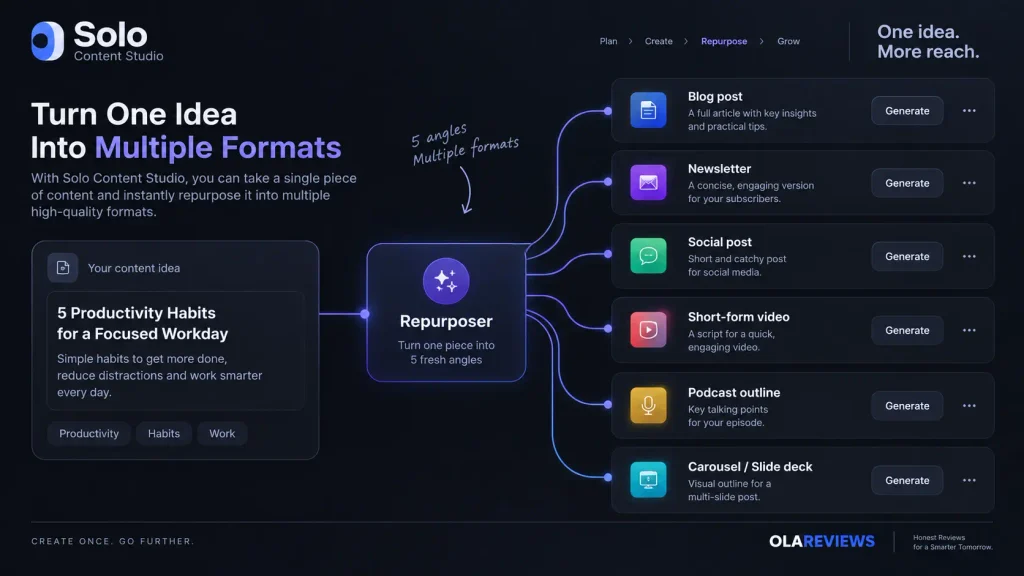
You are not limited to conventional blog writing.
The current platform supports formats including:
| Content Type | Available |
|---|---|
| Blog posts | Yes |
| Newsletters | Yes |
| Social posts | Yes |
| Short-form video scripts | Yes |
| YouTube outlines/scripts | Yes |
| Podcast outlines | Yes |
| Email sequences | Yes |
| Sales pages | Yes |
| Carousels | Yes |
| Slide decks | Yes |
| Content ideas | Yes |
| Content repurposing | Yes |
That breadth is important because the real time savings come from turning one idea into multiple assets.
For example, instead of writing a blog post and then separately creating social content around it, you can use the platform’s repurposing workflow to create multiple angles from an existing draft.
Solo Content Studio Credits and Output Limits
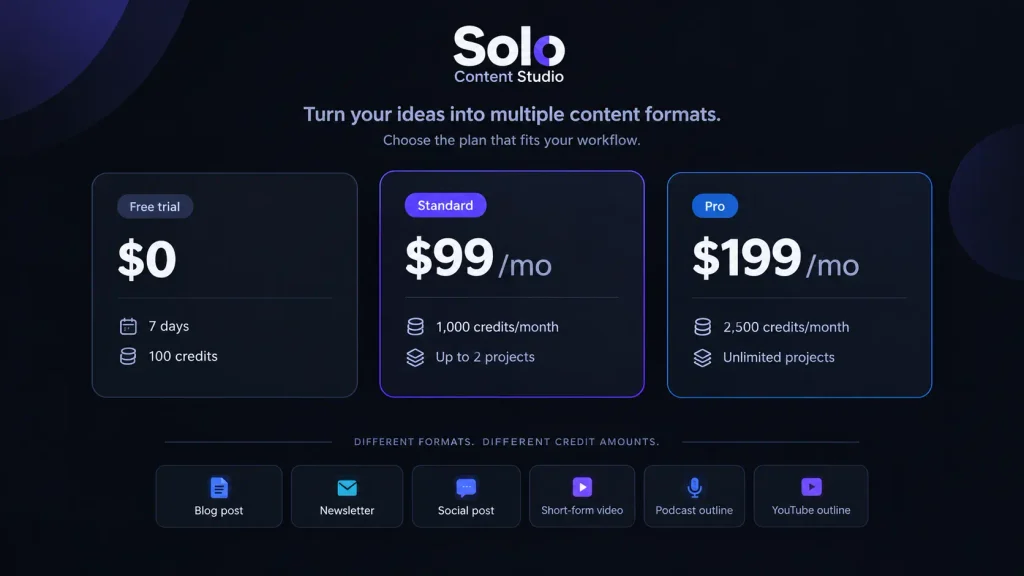
The credit system deserves attention before you subscribe. Standard provides 1,000 credits per month, while Pro provides 2,500 credits. Different formats consume different amounts, so a credit does not represent one universal piece of content. Solo Content Studio gives an example of what 1,000 credits can represent: around six newsletters, four blog posts, three email sequences, 40 tweets, ten LinkedIn posts, four podcast episodes, four YouTube videos, and 20 Reels. These are illustrative usage levels rather than a fixed monthly quota because actual consumption depends on the formats you generate.
That means you should think about your actual publishing schedule before choosing a plan. If you mostly create short social posts, 1,000 credits can stretch considerably further. If your strategy revolves around long-form blogs, newsletters, and scripts, you will use credits faster.
Is Solo Content Studio Worth It for AI Content Creation?
Solo Content Studio makes the strongest case for itself when you value voice consistency and repeatable workflows more than the lowest possible subscription price. If you are a coach who creates content personally, the specialization can be useful. You can train the platform with your writing samples and preferences, then use different specialists without rebuilding the same instructions every time. It is also more structured than simply opening ChatGPT or Claude and starting a new conversation for every article.
However, that structure comes with a price. At $99 per month for Standard, this is not positioned as a cheap AI writing assistant. You are paying for the complete content system, including specialized workflows, brand training, projects, and automation. For a blogger who only needs occasional articles, cheaper AI content writing tools may make more financial sense. For a coach producing content across several formats every week, the economics can look different.
Final Verdict
Solo Content Studio is an unusually focused approach to AI Content Creation. Rather than competing mainly on the number of templates, it tries to build a repeatable content team around your voice, audience, and publishing routine. The seven-day trial gives you 100 credits and access to the platform’s main specialists, making it sensible to test your own real content before paying. If keeping your content consistent across blogs, social posts, newsletters, videos, and emails is the problem you’re trying to solve, Solo Content Studio is worth exploring. But is a specialized AI content team the next step for solo creators, or will general AI assistants catch up?
FAQ
Is Solo Content Studio suitable for beginners?
Yes. The provider says the initial setup takes roughly 30 minutes and uses questions and writing samples rather than requiring you to construct complicated prompts. You can then train a specialist and begin generating drafts.
Do you need ChatGPT or Claude separately?
No. Solo Content Studio says its subscription includes the underlying AI usage, so you do not need a separate Claude or ChatGPT subscription to operate the platform. It currently identifies Claude Opus 4.7 as the model powering the Studio.
Is Solo Content Studio good for general AI content creation?
It depends on your needs. If you want broad experimentation, a general AI assistant may offer more flexibility. If your goal is structured AI Content Creation around one or more brands, Solo Content Studio’s specialized workflow is more relevant. Its strongest audience is business, marketing, and lifestyle coaches who are the face of their brands.
Editorial disclosure: This article is independently researched using the provider’s current September 2026 product and pricing information.