AI Website Analytics: PagePulse Review 2026, Features and Pricing
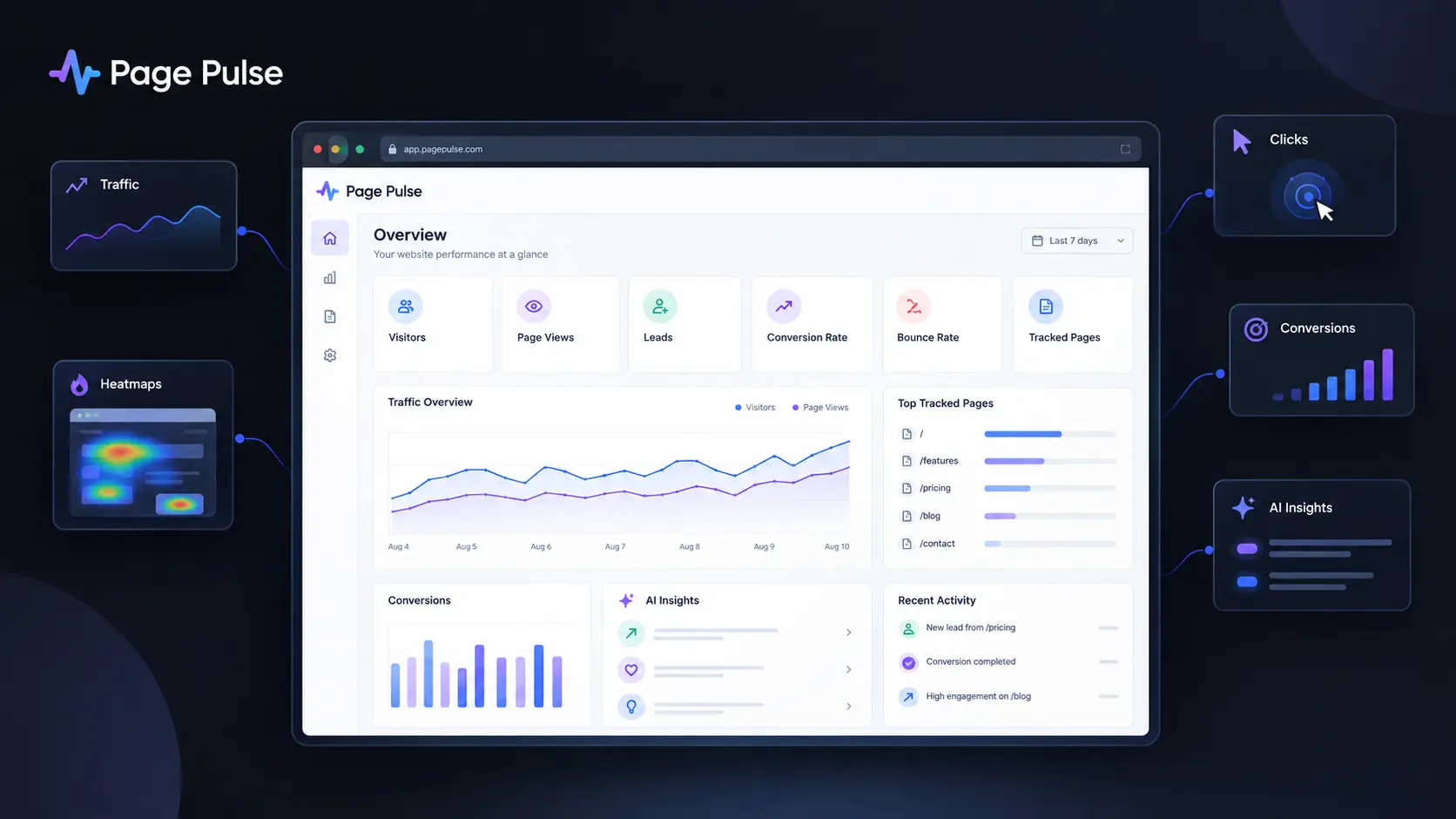
Understanding what happens on your website can get complicated fast. You may have traffic in Google Analytics, clicks in another tool, heatmaps somewhere else, and conversion data spread across several reports. AI Website Analytics tools aim to reduce that mess by turning raw website activity into clearer answers and useful recommendations. Page Pulse takes a simpler approach. Instead of trying to replace every analytics platform, it combines traffic, clicks, conversions, heatmaps, and AI insights in one dashboard. Its free plan also removes the usual traffic-based pricing problem, which makes it interesting for smaller websites. I evaluated Page Pulse alongside seven major analytics alternatives using current product information, pricing, features, and setup workflows available in September 2026.
How We Evaluate AI Website Analytics Tools
For this comparison, I evaluated eight website analytics platforms during a September 2026 review pass. The goal was not simply to count features. I focused on how useful each platform is when you need to move from “something changed” to “here is what I should investigate next.”
The main criteria were:
- Ease of installation and initial setup
- Traffic, conversion, and behavioral analytics
- AI-powered insights and recommendations
- Heatmaps and session recordings
- Privacy and data ownership
- Pricing limits and scalability
I also checked current pricing pages and product documentation because analytics pricing can change quickly, particularly when billing depends on sessions, events, pageviews, or tracked pages.
AI Website Analytics Tools at a Glance
| Tool Name | Best For | Starting Price |
| Page Pulse | Simple analytics with AI insights | Free |
| Google Analytics 4 | Advanced website and marketing analytics | Free |
| Microsoft Clarity | Heatmaps and session recordings | Free |
| Plausible Analytics | Privacy-focused website analytics | $9/mo |
| Fathom Analytics | Simple privacy-first analytics | $15/mo |
| Hotjar | Behavioral analysis and user research | Free |
| Matomo | Data ownership and advanced analytics | Free |
| Mixpanel | Product analytics and event tracking | Free |
Page Pulse: Best AI Website Analytics for Simple Dashboards
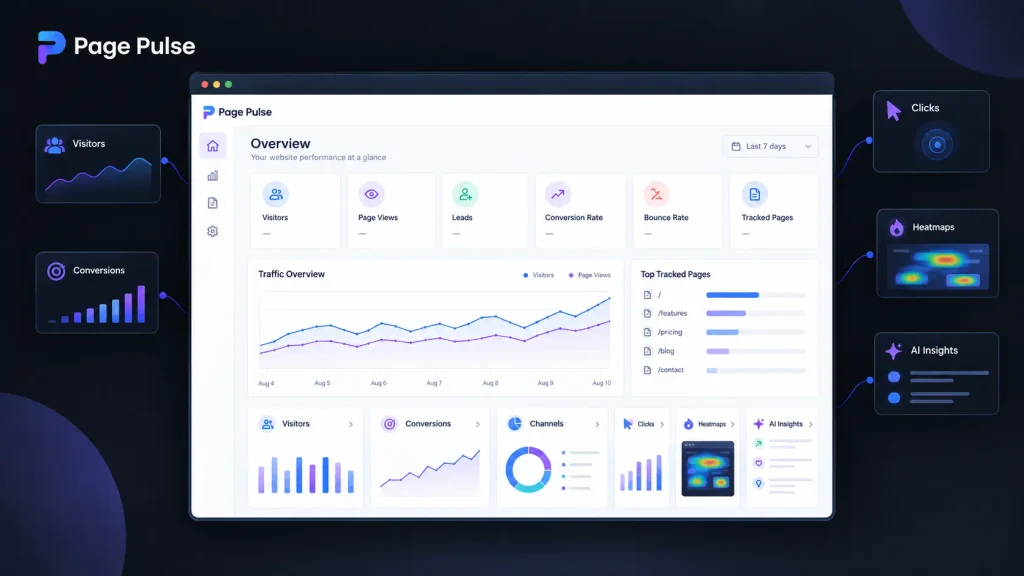
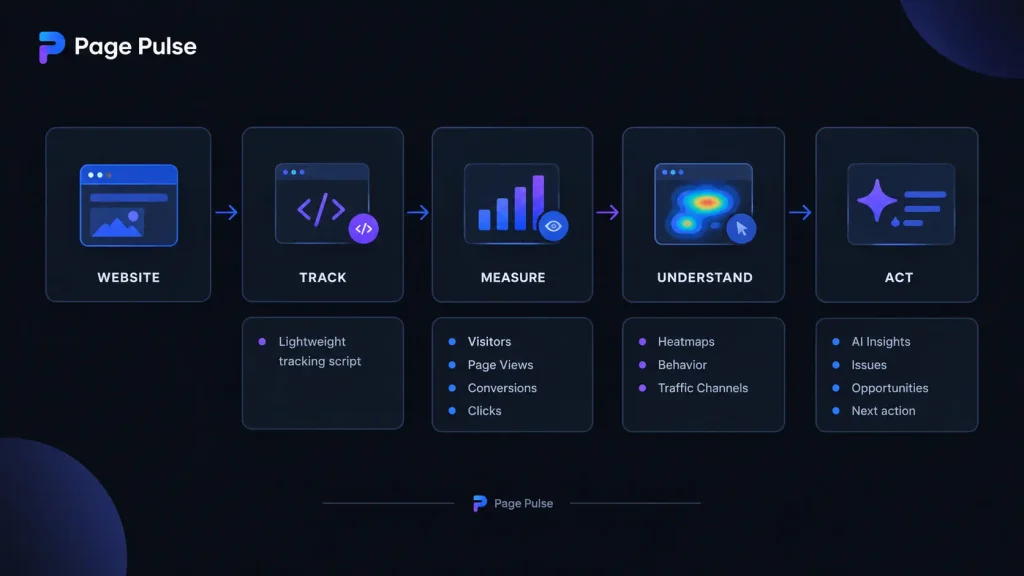
Page Pulse is the most interesting option if you want AI Website Analytics without building a complicated reporting stack. Its main dashboard brings together visitors, page views, leads, conversion rate, bounce rate, clicks, and other website signals. It also adds heatmaps and AI insights. The setup is intentionally lightweight. Page Pulse says its tracking script is under 3 KB, and its workflow is essentially to install the script, wait for data, and open the dashboard. One useful detail is that the platform does not charge based on traffic. Even the free plan includes unlimited traffic, although the number of tracked pages is limited. That makes the product especially appealing when your website is growing but you do not want every traffic spike to increase your analytics bill. Its AI layer is also more practical than simply adding an “AI” label to a dashboard. The platform describes AI insights as a way to surface issues and opportunities automatically, while its heatmaps show where visitors click, scroll, and engage.
Pros
- Unlimited traffic on every plan
- Combines analytics, conversions, heatmaps, and AI insights
Cons
- Free plan tracks only one page
- Less mature for highly complex enterprise analytics
Pricing: Free includes 1 page, unlimited traffic, 14 days of data retention, basic analytics, and 15 AI insights per month. Starter is $29/month for 2 pages and 100 AI insights. Growth is $79/month for 5 pages and 250 AI insights. Pro is $129/month for 10 pages and 750 AI insights. Scale is $199/month for 20 pages and 1,500 AI insights per month.
Google Analytics 4: Best AI Analytics Tools for Advanced Reporting
Google Analytics remains difficult to ignore because it can handle far more than basic visitor counting. Its machine-learning features can detect unusual changes, generate insights, and provide predictive metrics when your property has enough eligible data. The biggest 2026 development is its growing AI layer. Google has introduced generated insights and an Ask Advisor experience powered by Gemini. Ask Advisor can answer questions about a property, generate visualizations, and point you toward relevant reports. There is also a useful change for businesses measuring AI traffic. Google Analytics can identify visits coming from recognized AI assistants through a dedicated AI Assistant channel. This makes GA4 particularly useful if you want to understand how traditional search and generative AI are contributing to website traffic.
Pros
- Extremely deep reporting and attribution capabilities
- Strong machine-learning and AI functionality
Cons
- More complicated than lightweight analytics platforms
- Setup quality depends heavily on correct event tracking
Pricing: The standard Google Analytics 4 product is available at no charge. Google Analytics 360 is the paid enterprise offering with additional capabilities and limits.
Microsoft Clarity: Best for Free Behavioral Analytics

Microsoft Clarity is the easiest recommendation when your main question is not “where did visitors come from?” but “what did they actually do?” The platform provides session recordings and heatmaps, allowing you to watch visitor journeys and see where people click, scroll, or stop engaging. Its current product also includes AI summaries, AI chat, and AI visibility features. The useful part is that you can use Clarity alongside another analytics platform rather than replacing it. For example, GA4 can tell you that a landing page has a weak conversion rate, while Clarity can help you inspect the behavior behind that result. Microsoft says Clarity is free forever and does not impose traffic-based pricing. Its 2026 AI visibility features are also notable because Clarity can show how AI experiences surface your brand and which pages receive citations.
Pros
- Free with no traffic limit
- Excellent combination of recordings, heatmaps, and AI summaries
Cons
- Not designed to replace every advanced marketing analytics function
- Reporting depth is different from GA4 or Mixpanel
Pricing: Free forever, with no traffic-based charge.
Plausible Analytics: Best for Privacy-Focused Website Analytics Software
Plausible Analytics is a strong fit if you want useful website analytics without turning your dashboard into an analytics laboratory. It focuses on core traffic metrics, goals, events, segments, and reporting while keeping privacy central to the product. The current Starter plan begins at $9/month for up to 10,000 monthly pageviews. Growth is $14/month and Business is $19/month, with higher plans adding features such as funnels, user journeys, revenue attribution, custom properties, and API access. One practical detail is its installation testing tool. Plausible provides a testing feature inside the site settings that can send traffic to your website and verify whether the integration is working correctly. That is the kind of small operational feature you appreciate when you do not want to troubleshoot a tracking script manually.
Pros
- Lightweight, privacy-focused analytics
- Straightforward pricing based on usage
Cons
- No permanent free plan
- Less behavioral analysis than Clarity or Hotjar
Pricing: Starter is $9/month, Growth is $14/month, and Business is $19/month at the current 10,000 monthly pageview tier. Plausible also offers a 30-day free trial without a credit card.
Fathom Analytics: Best for Simple Privacy-First Reporting
Fathom Analytics takes the minimalist route. Instead of trying to become an enormous analytics suite, it focuses on helping you understand website traffic while avoiding cookies and keeping visitor privacy at the center. Its plans include features such as event tracking, ecommerce tracking, API access, unlimited email reports, unlimited data exports, and permanent data retention. The interesting pricing detail is how Fathom handles occasional traffic spikes. It does not immediately shut off analytics when you exceed your pageview limit. Instead, it looks at sustained usage and contacts you when an upgrade is appropriate. For a content site or SaaS business that occasionally gets featured or goes viral, that is a much friendlier approach than an instant tracking wall.
Pros
- Simple privacy-first analytics
- Includes API, events, ecommerce tracking, and exports
Cons
- No permanent free hosted plan
- Fewer behavioral visualization features than Clarity
Pricing: Fathom starts at $15/month with a 7-day free trial. Plans scale according to average monthly pageviews.
Hotjar: Best AI Analytics Tools for Understanding User Behavior
Hotjar is particularly useful when numerical analytics are not enough. Its Observe product combines heatmaps and recordings, while the wider platform also includes surveys, feedback, interviews, and user testing. The free Basic plan tracks up to 35 daily sessions and includes unlimited heatmaps. The Plus plan starts at $39/month and supports up to 100 daily sessions, while Business starts at $99/month for 500 daily sessions. One detail worth noticing is that Hotjar defines a session as a visitor’s complete journey across pages. That matters because the number on your analytics dashboard is not necessarily comparable with a pageview-based product. Hotjar is therefore strongest when your workflow is: identify a problem in your analytics, watch sessions, inspect the heatmap, then collect direct feedback.
Pros
- Strong behavioral analytics
- Combines recordings, heatmaps, surveys, and feedback
Cons
- Paid plans can become expensive as session volume grows
- More focused on behavior than broad marketing attribution
Pricing: Basic is free. Plus starts at $39/month, Business at $99/month, and Scale at $213/month.
Matomo: Best for Data Ownership
Matomo is the choice to consider when control over your analytics data matters as much as reporting. Its major distinction is that you can use the cloud-hosted version or run Matomo yourself. The self-hosted Community edition is free, while paid cloud and enterprise options scale according to traffic and requirements. Matomo states that its hosting options provide data ownership and privacy compliance. For organizations with technical teams, the self-hosting route can be particularly attractive because the company controls where the analytics infrastructure operates. The trade-off is complexity. You gain control, but you also inherit more responsibility for infrastructure and maintenance.
Pros
- Strong data ownership options
- Powerful analytics and ecommerce capabilities
Cons
- Self-hosting requires technical resources
- Advanced cloud plans can become expensive
Pricing: Matomo On-Premise Community is free. Matomo Cloud pricing currently starts at $26/month for 50,000 hits and reaches $204/month for 1 million hits.
Mixpanel: Best for Product and Event Analytics
Mixpanel is better suited to product teams than a simple content website. Its strength is understanding events, funnels, retention, feature usage, and user behavior inside digital products. The free plan supports up to 1 million events per month, 10,000 session replays, and up to 10 active feature flags. The pricing model also demonstrates why analytics tools cannot always be compared by monthly subscription alone. Mixpanel’s Growth plan is based heavily on event volume. Its current pricing calculator shows $120/month on annual billing for 18 million events per year. If your website is really a product with logins, workflows, subscriptions, and hundreds of meaningful user actions, Mixpanel can provide much deeper product intelligence than a traditional pageview dashboard.
Pros
- Excellent event, funnel, and retention analysis
- Generous free event allowance
Cons
- More complex for simple websites
- Event-based pricing requires careful tracking planning
Pricing: Free includes up to 1 million events/month. Growth starts at $0 and scales with event usage, while Enterprise pricing is custom.
Feature Comparison: Which Analytics Platform Fits Your Workflow?
| Tool | AI Insights | Heatmaps | Session Recordings | Free Plan | Main Pricing Limit |
| Page Pulse | Yes | Yes | No | Yes | Tracked pages |
| Google Analytics 4 | Yes | No | No | Yes | Advanced enterprise features |
| Microsoft Clarity | Yes | Yes | Yes | Yes | None for traffic |
| Plausible | Limited | No | No | Trial | Pageviews |
| Fathom | No major AI layer | No | No | Trial | Pageviews |
| Hotjar | AI features | Yes | Yes | Yes | Daily sessions |
| Matomo | Advanced analytics | Add-ons/options | Add-ons/options | Yes, self-hosted | Hosting/traffic |
| Mixpanel | AI/product intelligence | No | Yes | Yes | Events |
Final Verdict: Is Page Pulse Worth Trying?
Page Pulse is worth a look if you want AI Website Analytics without building a complicated analytics stack. Its strongest advantage is the combination of simple reporting, conversions, heatmaps, and AI insights, while unlimited traffic on every plan keeps the pricing easier to predict. For advanced marketing analytics, GA4 remains hard to beat. Clarity is the better free choice for recordings, while Plausible and Fathom are strong privacy-focused options. But as AI becomes a normal part of analytics, will the best analytics tool eventually be the one that answers your questions instead of simply showing you charts?
FAQ
What are AI Website Analytics tools?
AI Website Analytics tools use machine learning or generative AI to help you interpret website data instead of forcing you to manually inspect every report. Page Pulse combines AI insights with traffic, conversions, clicks, and heatmaps, while Microsoft Clarity now provides AI summaries, AI chat, and AI visibility features.
Is Page Pulse better than Google Analytics?
It depends on what you need. Page Pulse is easier to understand if you want a compact dashboard with analytics, conversions, heatmaps, and AI insights. Google Analytics is the stronger choice when you need detailed attribution, event analysis, advertising measurement, and deeper customization.
Can you use two analytics tools together?
Yes. In fact, that can be the better approach. You might use GA4 for acquisition and conversion reporting, then Clarity for recordings and heatmaps. Similarly, a privacy-focused tool such as Plausible or Fathom can provide a simpler reporting layer while another platform handles specialized analysis.
Editorial disclosure: This is an independent review based on current product documentation, public pricing, and product workflows. Pricing and features can change.