Aportio Review 2026: AI Email Triage for IT and MSP Service Desks
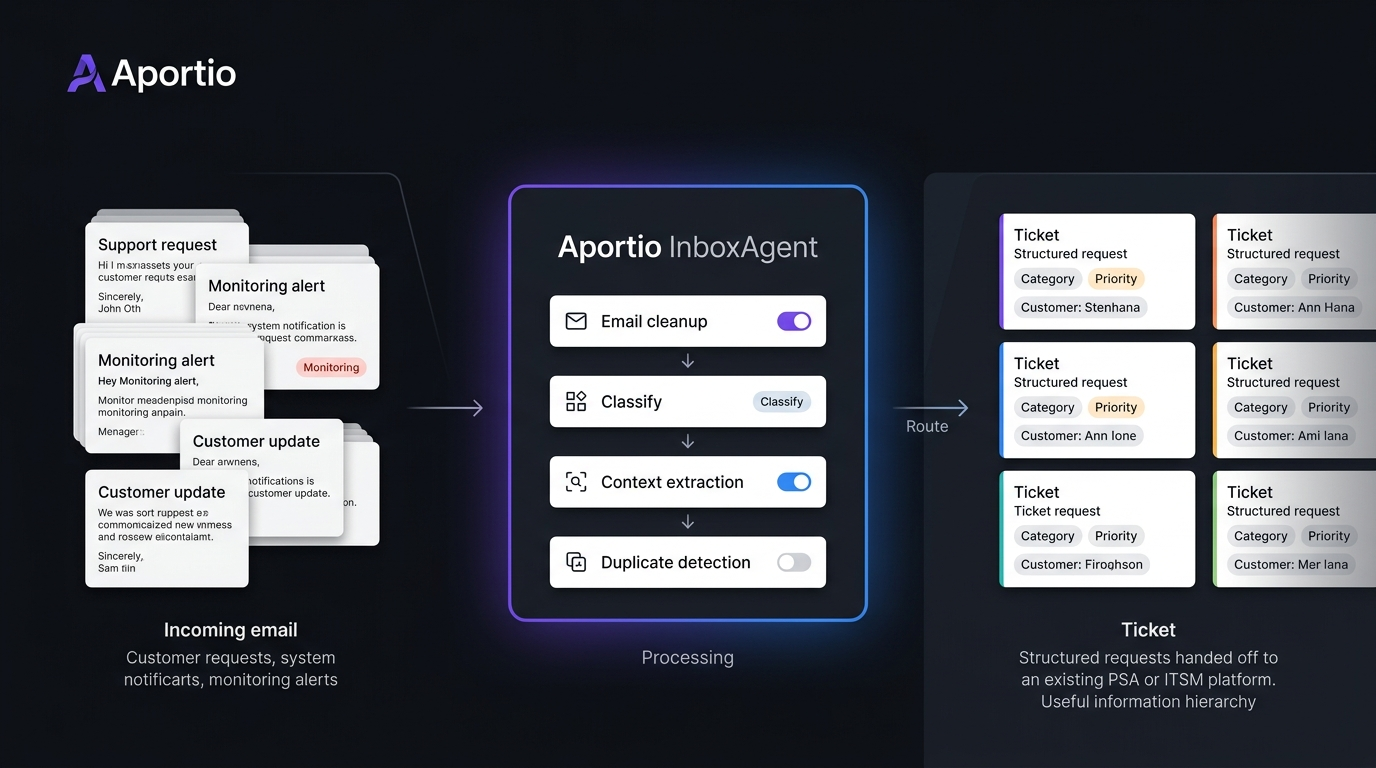
Aportio stands out because it focuses on a part of the service desk that is easy to overlook: the work that happens before an engineer starts a ticket. Its InboxAgent reads incoming emails, cleans the content, classifies requests, identifies context, reduces duplicate tickets, and sends usable information into a PSA or ITSM system.
That makes this Aportio review 2026 less about another AI chatbot and more about a practical question: can AI email triage reduce the manual work that builds up between a shared inbox and an engineer’s queue?
What Is Aportio AI?
Aportio AI is a group of AI products for IT service desks and customer service teams. Its main IT product, InboxAgent, is designed to automate email handling before and during ticket creation. Aportio says it can read the complete email, classify its intent, capture relevant information, route the message, and create or update the appropriate record.
The product is not positioned as a replacement for an existing PSA or ITSM platform. Instead, it sits between incoming email and the system already used by the service team.
This makes the product particularly relevant for teams that already rely heavily on email. Aportio says up to 70% of IT support tickets still arrive by email, although this is a vendor-stated figure rather than an independent industry measurement.
For related service desk planning, see IT service desk automation guide.
How Aportio Handles AI Email Triage
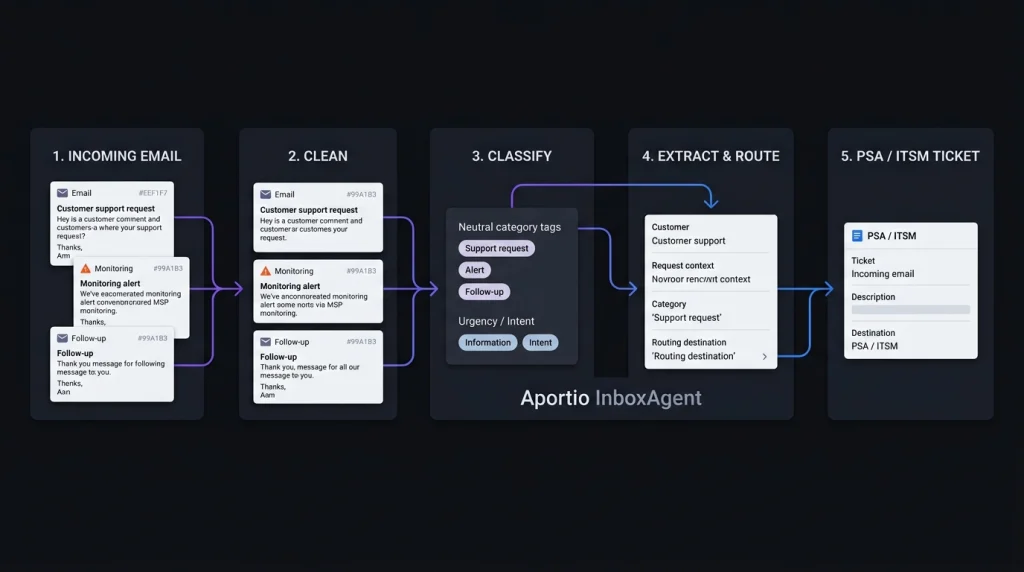
The interesting part of Aportio’s AI email triage software is its focus on cleaning information before it reaches the engineer.
InboxAgent can:
- Read the full email instead of only the subject line
- Classify incoming requests
- Route messages to the appropriate workflow
- Capture information for the PSA
- Detect duplicate messages
- Group related alerts
- Correlate tickets between systems
- Create or update records
- Support automated email responses
The alert feature is especially relevant to MSPs. A monitoring platform can generate many messages around one underlying event. Aportio says related alerts can be grouped into a single ticket, reducing the need for engineers to match and close tickets manually. That is a more specific use case than general AI help desk automation.
Aportio for IT Service Desk Automation
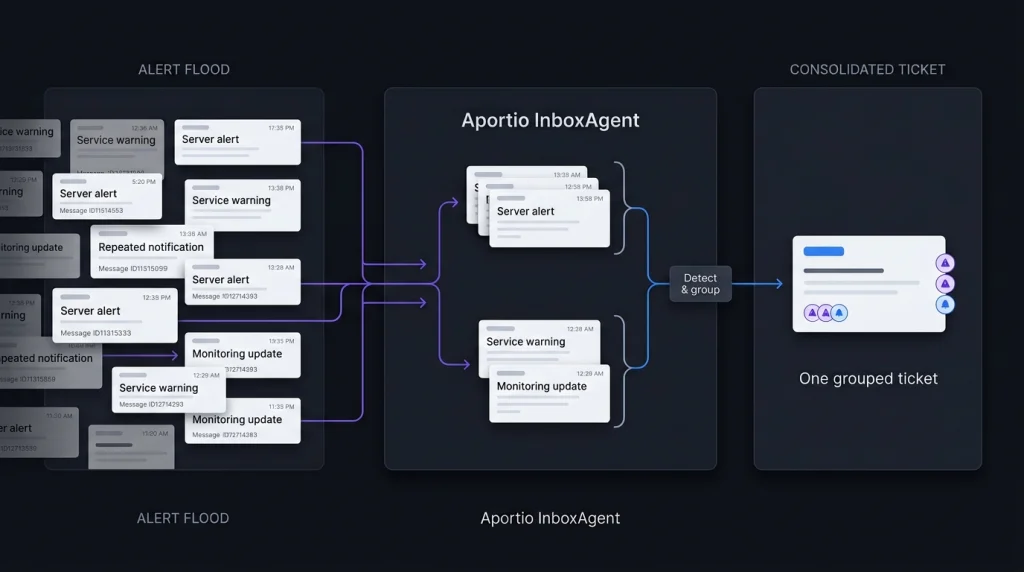
Aportio’s main strength is the pre-ticket layer. Consider an MSP receiving hundreds of emails and monitoring alerts each day. An engineer may need to identify the customer, understand the issue, remove duplicate messages, choose a category, and check whether another ticket already exists.
InboxAgent is designed to automate those steps before the engineer handles the actual technical problem. Aportio says customers have achieved 50% to 70% less triage work, along with 70% fewer alert-driven tickets and 2 to 4 minutes saved per email. These are Aportio’s own reported results, so businesses should validate them with their own data before treating them as expected savings. For a broader comparison, see AI help desk automation tools.
MSP Service Desk Software and Integrations
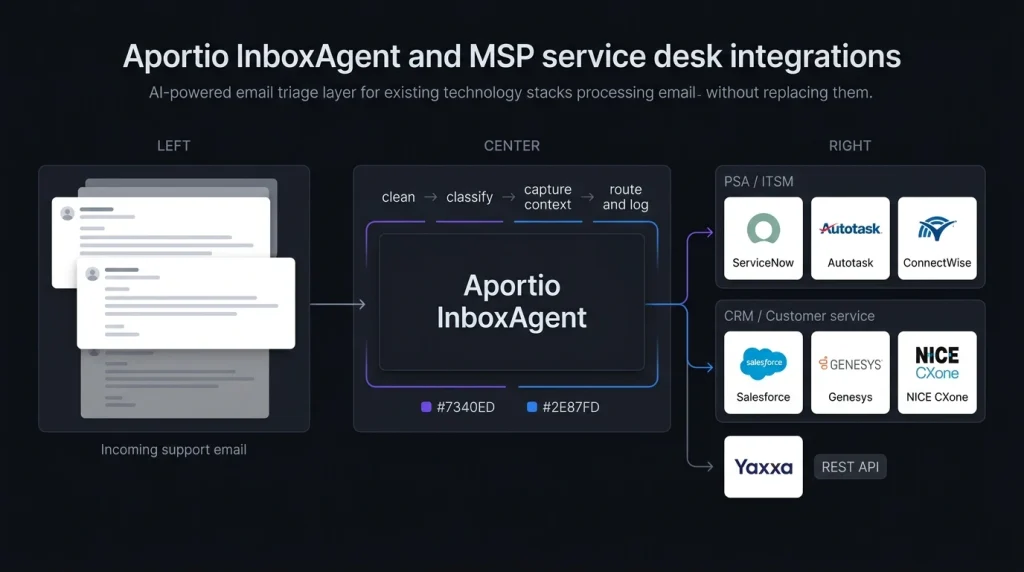
Aportio is designed to work with an existing technology stack rather than replace it. Its current website lists integrations including ServiceNow, Autotask, ConnectWise, Yaxxa, NICE CXone, Genesys, and Salesforce. Aportio also advertises a REST API. ConnectWise’s current marketplace also lists Aportio: AI Email Agents as an integration partner.
This matters for MSP service desk software because changing a PSA or ITSM platform can be far more disruptive than adding an automation layer around the existing system. Still, we would confirm the exact connector and supported workflow before purchasing. An integration being listed does not mean every PSA function is automatically supported.
Aportio Pricing in 2026
Aportio pricing is not publicly displayed. The current Aportio website directs visitors toward a demo or sales conversation instead of showing a standard price list. A September 28, 2026 pricing review also reports no public pricing page, per-seat price, per-ticket price, or self-service trial.
That means buyers should ask how their quote is calculated.
Before a demo, prepare:
- Monthly email volume
- Monitoring alert volume
- Required PSA or ITSM integrations
- Number of products required
- Implementation costs
- Support and onboarding terms
- Contract length
- Any usage limits
For an MSP, Aportio pricing should be compared with the amount of manual triage currently being performed, not simply against another software subscription.
Security and Trust
Aportio currently states that it is ISO 27001:2022 certified and uses encryption in transit and at rest plus access controls. It also says its AI is used to classify, summarize, and analyze information rather than generate unsupported content. For an IT support environment, these claims should still be checked against your company’s security requirements.
Teams handling sensitive customer information can also use the NIST AI Risk Management Framework as a reference for evaluating AI risks and controls. The key checks should include data handling, retention, access permissions, audit records, and how customer information is processed.
Aportio Alternatives: What Should You Compare?
Aportio alternatives should be compared by the job they perform, not simply by the word “AI.” If the main problem is email classification, duplicate alerts, routing, and ticket creation, a pre-ticket automation product is the relevant category. If the goal is for AI to answer customer questions and resolve tickets, a full AI support agent may be more relevant.
We would compare:
| Feature | What to check |
| AI email triage | Classification and routing accuracy |
| Email ticket automation | Ticket creation and updates |
| Alert handling | Duplicate detection and grouping |
| IT support automation | Reduction in manual work |
| PSA integrations | Compatibility with your current system |
| AI responses | Whether replies are generated automatically |
| Security | Data handling and access controls |
| Pricing | Quote-based or public pricing |
For teams considering wider automation, see customer support AI software comparison.
How We Would Test Aportio
A short pilot using real historical emails would provide more useful evidence than a standard product demo.
Take a sample containing normal support requests, duplicate messages, monitoring alerts, unclear requests, and urgent issues. Then measure:
- Customer assignment accuracy
- Ticket classification accuracy
- Duplicate and alert grouping
- Engineer time saved
- Incorrect automation decisions
This approach separates Aportio’s vendor-reported results from the results your own service desk can actually achieve.
Conclusion
Our Aportio review 2026 shows a focused product rather than a general-purpose AI help desk. Its main job is to make incoming email cleaner and more useful before engineers have to deal with it. That focus is important for teams dealing with large volumes of support emails and monitoring alerts. Aportio’s reported 50% to 70% reduction in triage work and 70% reduction in alert-driven tickets are promising, but they remain vendor-reported figures that should be tested against real service desk data. For an email-heavy IT or MSP operation, the most useful evaluation is therefore simple: measure how much manual work disappears between the inbox and the ticket queue.
Aportio Review 2026: FAQ
Is Aportio an AI email triage tool?
Yes. InboxAgent is designed for AI email triage, including classification, routing, information capture, duplicate detection, and ticket handling.
Is Aportio pricing public?
No. Current public information does not provide a standard price list. Businesses need to contact Aportio for a quote.
Can Aportio automate email tickets?
Yes. InboxAgent can create or update PSA records and automate parts of the email-to-ticket workflow.
Is Aportio suitable for MSPs?
Its features are aimed at IT service desks and MSP workflows, particularly email triage and monitoring-alert management. ConnectWise also currently lists Aportio in its marketplace.
What is the main thing to test before buying?
Test classification, customer matching, duplicate detection, alert grouping, and ticket creation using your own historical emails. Vendor-reported savings are useful, but your own data should determine whether the automation delivers enough value.