Social Media Management: Buffer vs Publer Which One Is Better?
Managing several social accounts can quickly become a repetitive job. You create a post, adapt it for Instagram, LinkedIn, Facebook, or X, choose a publishing time, check the preview, and then repeat the process for the next account. That is where social media management tools can make a real difference. Instead of handling every network separately, you can organize content, schedule posts, and manage your publishing workflow from one place.
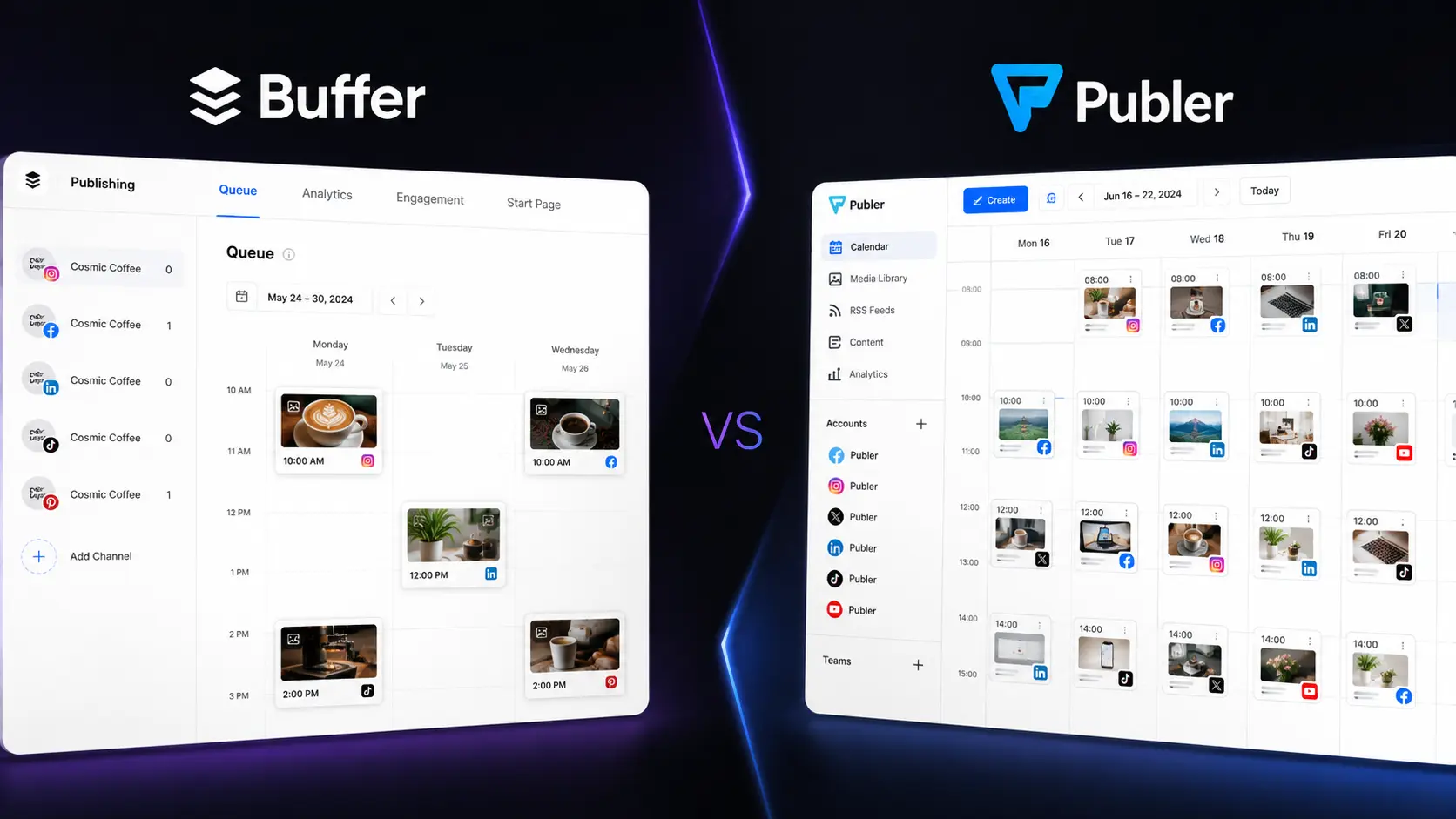
Two popular options are Buffer and Publer. Buffer focuses on a simple, creator-friendly experience, while Publer offers more scheduling, automation, bulk publishing, and account-management options. So, which platform should you choose in 2026? The answer depends on how you work, how many accounts you manage, and how much automation you actually need.
Editorial disclosure: This is an independent editorial comparison. Features and pricing can change, so verify current details before purchasing.
How We Evaluate Social Media Management Tools
We compared Buffer and Publer around the tasks you are most likely to perform when managing social accounts. Instead of judging them only by their feature lists, we focused on how each platform fits into a practical publishing workflow.
The main evaluation criteria were:
- Scheduling: How quickly you can create and queue posts.
- Publishing: How easily content can be distributed across different networks.
- Automation: Recurring posts, RSS workflows, evergreen content, and other time-saving features.
- Analytics: Whether performance data helps you improve future content.
- Collaboration: Tools for teams, agencies, and clients.
- Ease of use: How quickly you can find and use important controls.
The comparison is designed for social media managers, content creators, marketers, small businesses, agencies, and teams. We also considered how these platforms fit alongside other AI tools used by modern marketers and content teams.
Buffer vs Publer: At-a-Glance Comparison
| Tool Name | Best For | Starting Price |
| Buffer | Simple scheduling and creator-friendly publishing | Free |
| Publer | Multi-platform publishing and advanced scheduling | Free |
Buffer currently offers a Free plan for up to three channels. Its paid Essentials plan starts at $6 per channel per month when billed monthly. Publer also has a Free plan. Its Professional plan starts at $5 per month for one social account, while the Business plan starts at $10 per month for one social account. Pricing can vary based on billing frequency and the number of channels or accounts you add.
Best Social Media Management Tool for Simple Scheduling: Buffer
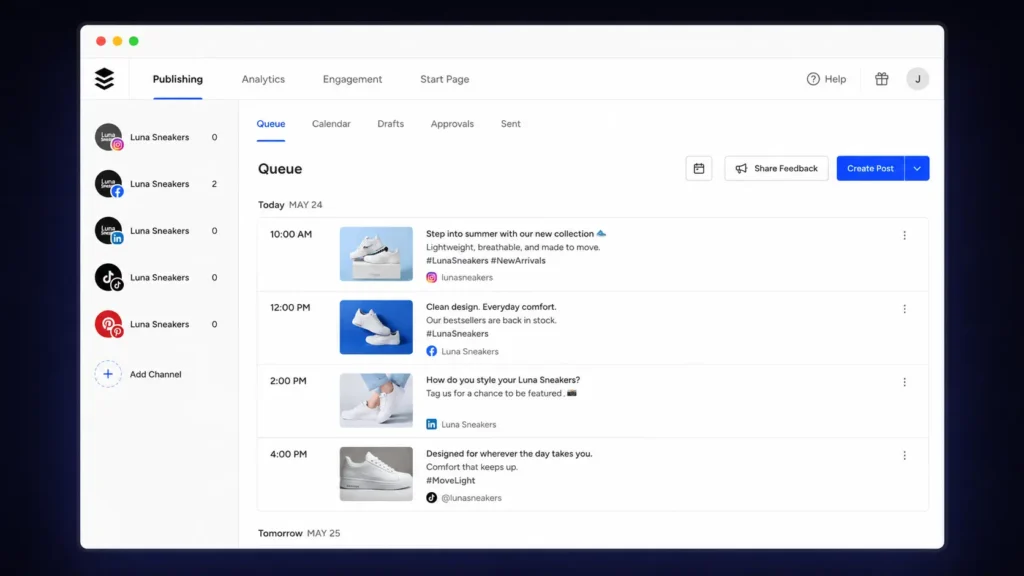
Buffer is the better option when your main goal is straightforward social publishing. The platform revolves around a familiar queue and calendar workflow, allowing you to create publishing slots and add content without manually selecting a new time for every post. That approach works especially well if you manage a personal brand, small business, or a limited number of social channels.
One useful detail is Buffer’s Free plan. You can manage up to three channels and have up to 10 scheduled posts per channel at a time. Once a scheduled post is published, that space becomes available again. Buffer supports several major networks, including Facebook, Instagram, LinkedIn, TikTok, Threads, Pinterest, YouTube Shorts, X, Bluesky, Mastodon, and Google Business Profile.
For users searching for social media scheduling tools, this relatively simple structure is a major advantage. You can create a regular publishing rhythm without spending hours configuring complicated automation rules. Buffer also offers publishing, analytics, engagement, and collaboration features on its paid plans, making it possible to expand your workflow as your social presence grows.
Pros
- Clean queue and calendar-based publishing workflow
- Easy starting point for creators and small businesses
Cons
- Per-channel pricing can become expensive as your account count grows
- Advanced automation users may want more flexibility
Pricing: Buffer has a Free plan supporting up to three channels. The paid Essentials plan starts at $6 per channel/month when billed monthly. Higher plans add additional publishing, analytics, and collaboration features.
Best Social Media Management Tool for Advanced Publishing: Publer
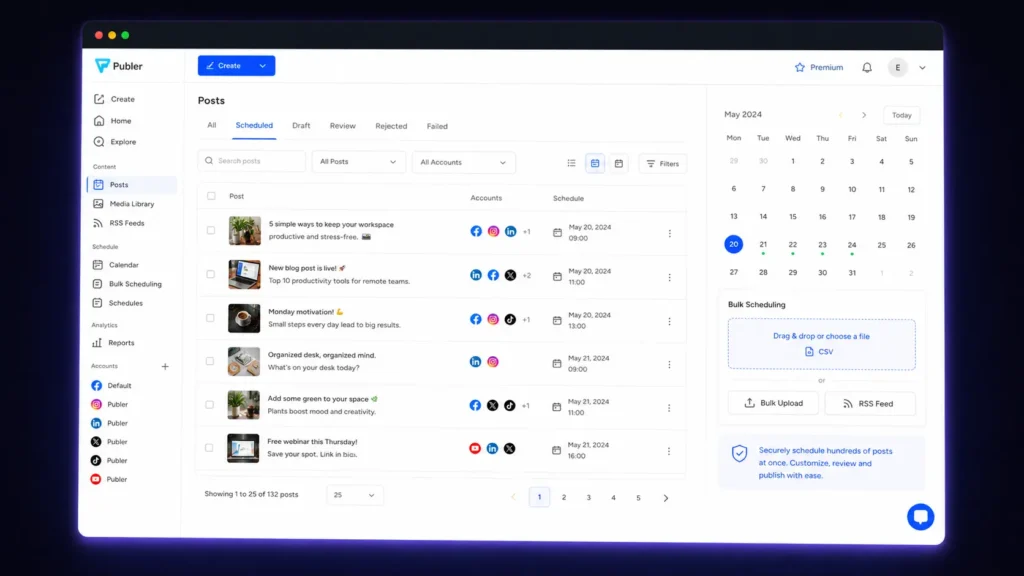
Publer takes a broader approach to social publishing. Rather than focusing primarily on a simple queue, it gives you more controls for bulk scheduling, recurring content, RSS automation, evergreen posts, workspaces, and multi-account management. That difference becomes more noticeable when your content calendar starts getting complicated.
For example, an agency managing multiple clients may need separate workspaces and publishing schedules. A marketer with a large content library may want to automate recurring posts instead of manually rebuilding the same schedule every month. Publer’s Professional plan includes unlimited scheduling, unlimited drafts, unlimited workspaces, RSS automations, and bulk scheduling for up to 500 posts. The Business plan adds features such as evergreen content recycling, recurring posts, advanced analytics, and best-time-to-post recommendations.
Its Free plan is useful for testing the workflow before upgrading. You can manage up to three social accounts, excluding X/Twitter, with up to 10 scheduled posts per account at a time. That makes Publer particularly attractive if you are looking for social media automation tools, rather than only a basic scheduler.
Pros
- Strong bulk scheduling and automation features
- Useful for agencies and multi-account workflows
Cons
- More controls can take longer to learn
- Advanced features require paid plans
Pricing: Publer has a Free plan. The Professional plan starts at $5/month for one social account, while the Business plan starts at $10/month for one social account. Annual billing can reduce the monthly-equivalent price.
Buffer vs Publer Feature Comparison
The biggest difference between Buffer and Publer is not simply which platform has more features. It is how each one approaches the publishing workflow.
| Feature | Buffer | Publer |
| Free plan | Yes | Yes |
| Free channels/accounts | Up to 3 channels | Up to 3 social accounts |
| Free scheduled posts | 10 per channel | 10 per account |
| Multi-platform publishing | Yes | Yes |
| Content calendar | Yes | Yes |
| Bulk scheduling | Available on applicable plans | Up to 500 posts on Professional |
| RSS automation | Available through applicable features | Included on Professional |
| Evergreen recycling | Limited compared with Publer | Available on Business |
| Recurring posts | Available depending on workflow | Available on Business |
| Analytics | Yes | Yes |
| Team collaboration | Yes | Yes |
| Workspaces | Available on applicable plans | Unlimited on Professional |
| Best suited to | Simple publishing | Advanced publishing and automation |
Buffer’s Free plan is particularly easy to understand. You get three channels and 10 scheduled posts per channel. Paid plans then increase your available publishing capacity and add additional features. Publer uses a different pricing and account model. Its Professional and Business plans give users access to more advanced publishing and automation capabilities, making the platform more attractive as the complexity of your social workflow increases. For social media publishing tools, this distinction matters. More features are not automatically better. If you only need a simple weekly schedule, paying for advanced automation may be unnecessary.
Which Tool Is Better for Social Media Scheduling?
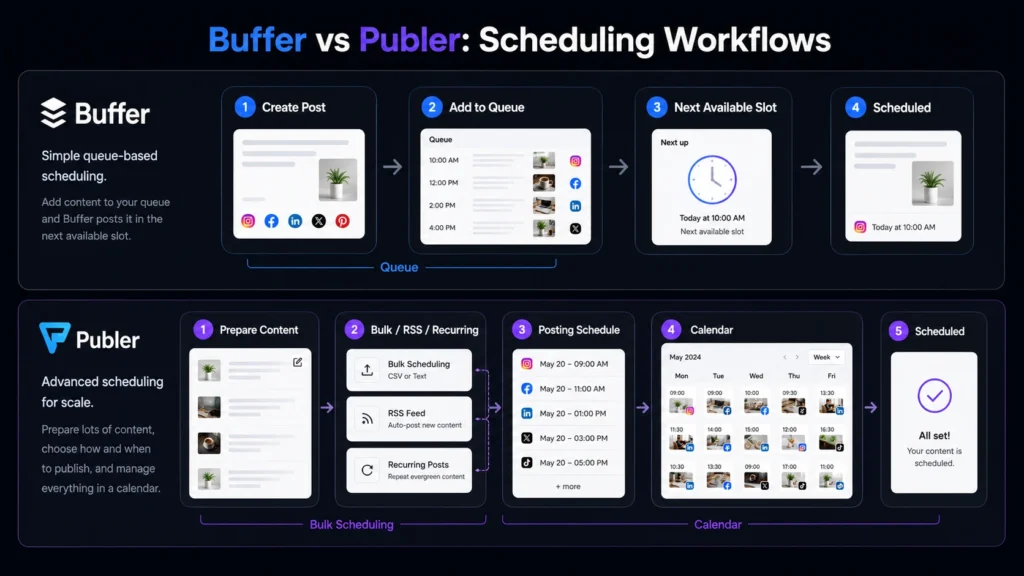
If you mainly want to schedule content without creating a complicated system, Buffer gets the edge. Its queue-based approach works well when you already know your publishing rhythm. You establish your preferred times and keep adding posts to the queue. Publer is better suited to more complicated scheduling requirements. Bulk publishing, recurring content, RSS automation, and evergreen workflows give you more ways to reduce repetitive work.
This is particularly useful if you regularly publish large batches of content. Instead of scheduling every post manually, you can prepare content in bulk and let the platform handle more of the distribution process. So, if your priority is simplicity, Buffer is the better choice. If your priority is scheduling flexibility, Publer deserves serious consideration.
Which Tool Is Better for Agencies?
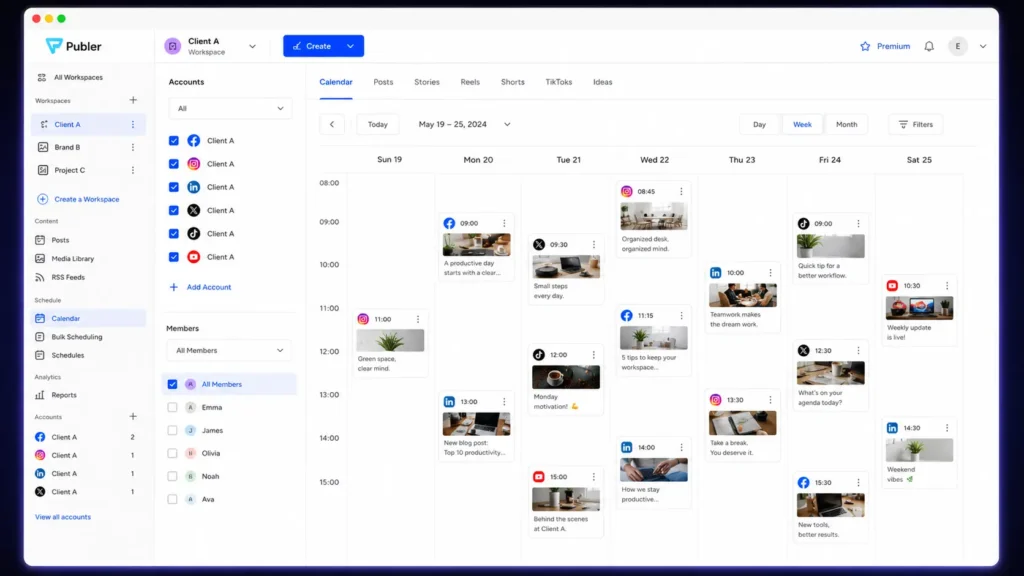
For agencies, Publer has the stronger overall case. An agency may manage several clients, each with different publishing calendars, social networks, content requirements, and reporting needs. Publer’s workspace and automation features are designed to handle a more structured multi-account workflow. Its Business plan is particularly relevant for teams that need recurring posts, evergreen content recycling, detailed analytics, and collaboration features.
Buffer can still be a good agency option, especially when clients prefer a simpler interface. Its collaboration features allow teams to work together on content and publishing. The deciding factor is workload. If your agency mainly schedules straightforward posts for a handful of accounts, Buffer may be enough. If you are managing larger content operations, Publer’s additional controls can save more manual work.
Which Tool Is Better for Creators and Small Businesses?
For creators and smaller businesses, Buffer is usually the easier starting point. Its Free plan allows you to experiment with three channels and up to 10 scheduled posts per channel. That is enough for many users who publish a few times per week. Publer is also worth testing if your content strategy involves recurring or bulk publishing. Its free tier gives you an opportunity to explore the workflow before paying for additional capabilities. Your choice should come down to how you prefer to work. If you want a cleaner interface with fewer decisions, start with Buffer. If you enjoy having more control over how content gets scheduled and recycled, try Publer.
Buffer vs Publer: Which One Offers Better Value?
Value depends on the number of accounts you manage. Buffer’s pricing can be attractive when you only need a small number of channels. Its Free plan is also useful for beginners who want to establish a basic publishing routine without immediately paying for software. Publer can offer stronger value when automation and bulk publishing become important. A marketer who would otherwise spend hours scheduling recurring content may benefit more from Publer’s additional controls. There is no reason to upgrade simply because a premium feature exists. Start with the free version, recreate your normal weekly workflow, and identify exactly where you hit a limit. That approach gives you a much clearer idea of whether the paid plan will actually save time.
Final Verdict: Buffer vs Publer
Buffer and Publer approach social publishing from different directions. Buffer is the better pick when you want a simple, structured workflow that gets your posts scheduled without unnecessary complexity. Publer is the stronger option when your social strategy involves bulk publishing, recurring content, automation, multiple workspaces, or more advanced scheduling requirements. The smartest move is to test both free plans with a real week’s worth of content. Connect your most important accounts, schedule the posts you normally publish, and see which workflow saves you more time. The best social media management tools should reduce your workload—not give you another dashboard to babysit. As your content operation grows, which platform will still fit the way you actually work?
FAQ
Is Buffer better than Publer?
Neither platform is universally better. Buffer is a strong choice if you want simple scheduling and an easy publishing workflow. Publer is better suited to users who need more automation, bulk scheduling, recurring content, workspaces, and publishing controls.
Which social media management tools are best for beginners?
Buffer is generally easier for beginners because its core workflow is straightforward. You can connect your accounts, create a schedule, and add posts to your queue without configuring a large number of settings. Publer can also work for beginners, but its broader feature set may take more time to explore.
Can you use Buffer or Publer for free?
Yes. Both platforms offer free plans. Buffer’s Free plan supports up to three channels and 10 scheduled posts per channel. Publer’s Free plan supports up to three social accounts, excluding X/Twitter, with up to 10 scheduled posts per account at a time. Free plans are particularly useful because you can test the platforms using your actual content instead of relying on a product demo.